Overview
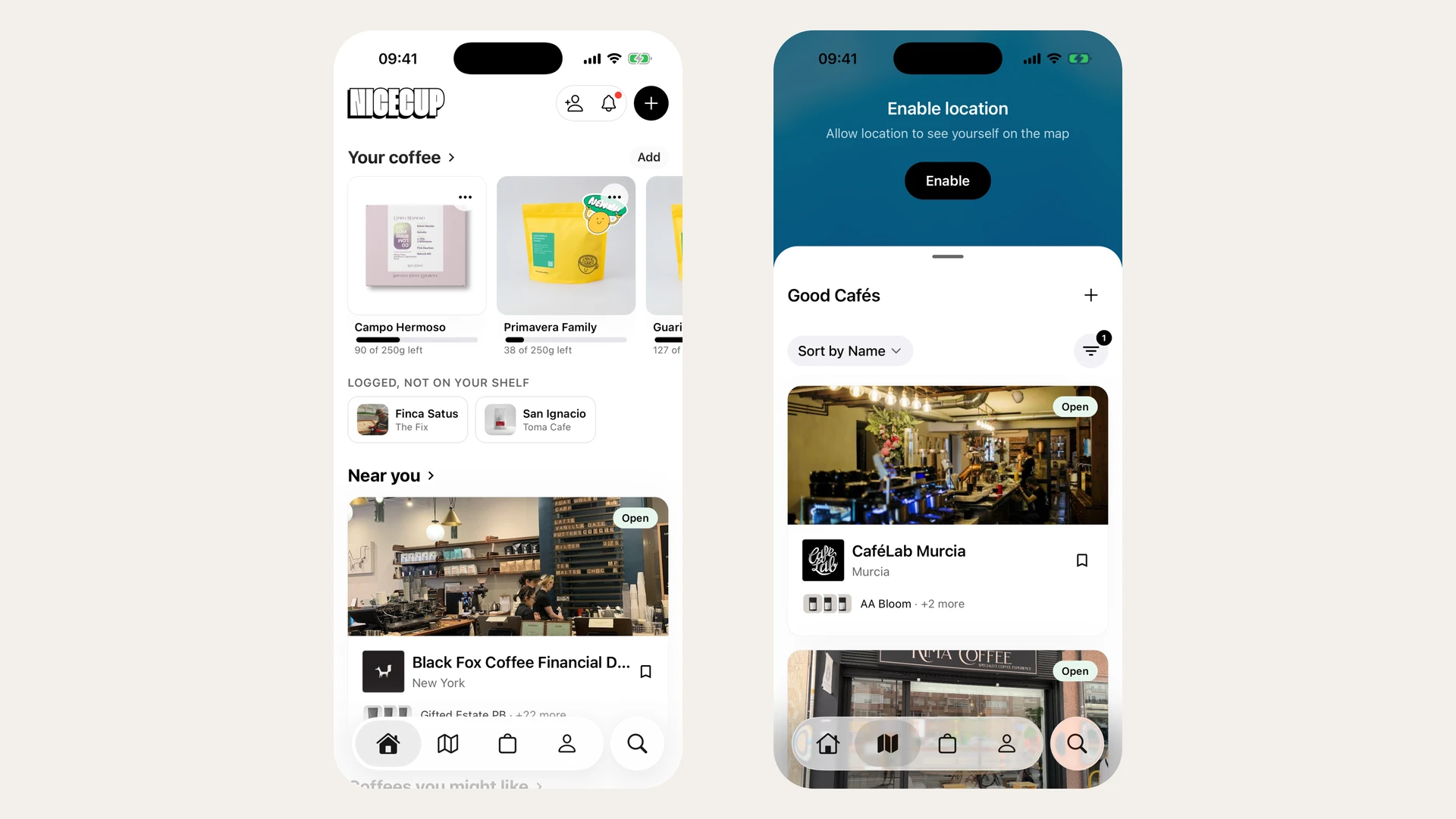
I designed and built NiceCup, a social app for discovering, rating, and brewing specialty coffee, end to end and alone, from a taste-profile-first product model through to weekly OTA releases shaped by real testers.
My role
Sole designer, strategist, and builder: problem framing, product model, UI/UX, and the code that shipped it.
Team
Me: design, product, and engineering. No PM backlog, no engineers to hide behind.
Timeline
Ongoing. Private beta, iterating weekly.
Impact Overview
Three design outcomes, not yet funnel math. NiceCup is a private beta with a handful of testers, so the impact so far lives in decisions, not dashboards.
- One tap to log. The app’s most frequent action went from a multi-field form to re-logging your last brew in a single tap (Quick Log).
- “Your coffees,” not a feed. The home screen now leads with your shelf, your run-out risk, and what to try next; social dropped below the fold (Home v2).
Why I started
Finding great specialty coffee shouldn’t require guesswork, but it does.
Offline, the only person who understands your taste is a good barista, who might steer you to another roaster’s beans, or might not. Online, general e-commerce (Shopify’s Shop app and the like) treats every product the same: it has no idea what “Ethiopia, washed, fruity” means versus “Colombia, natural, nutty.” It can’t connect the coffee you loved to the one you’d love next.
So the data that matters (your taste) is nowhere. NiceCup was my attempt to put it somewhere.
How I tackled it
Step #1: Start from lived experience, not a whiteboard
The vision came from four real moments, not a requirements doc:
- Taste as a fingerprint. If I logged and rated every coffee I drank, I’d build a taste profile, and recommendations would follow from my history, not a generic catalog.
- Recipes worth stealing. A barista in Antwerp handed my friend and me a filter coffee, then gave me the exact recipe. I brewed it at home and it was incredible, and I thought, someone else should be able to grab this.
- Gear, socially. The right recipe assumes the right gear. If I could see what a friend just bought, I’d discover brewing setups I’d never have asked about.
- Where to drink it. Coffee is social. In Madrid there are a thousand cafés and no good way to know which are real. ChatGPT suggests TripAdvisor-rated places that actually suck.
Four threads (discovery, recipes, gear, cafés), one product.
Step #2: Pick the model before the pixels
I deliberately didn’t start with “follow people” or “browse roasters.” The core interaction is the taste profile: you log what you brewed or tasted, rate it, and the app builds your flavor fingerprint. That single choice does three things at once: it gives you a reason to return after every cup, generates the data that powers real (not algorithmically suspicious) recommendations, and creates something genuinely shareable: “this is what I taste and why.”
Social is a utility here, not a feed to farm. You see what people you follow are brewing, grab their recipes, adapt them to your gear. No likes, no engagement bait.
Step #3: Ship it, then let testers steer
I opened v1 to a handful of serious coffee nerds and shipped weekly over OTA. Built on React Native + Expo with Supabase for auth, Postgres, storage, and edge functions (coffee scraping, OCR coffee extraction from a bag photo, push notifications), with Sentry for errors and PostHog for analytics. A large chunk of it was written with AI-assisted tooling. A surprising amount of it was typed straight from my phone.
The testers didn’t just beta-test it; they redirected it. v1 opened on a feed. That got pushed back hard, which is where the real frictions surfaced.
- Your tester drinks coffee every single day, and forgets to log it. Every single day.
- The “obvious” first screen, a feed of everyone’s activity, is exactly the screen your most serious users push back on.
Step #4: Find the real friction, on purpose
Those signals were symptoms, not root causes. To find why the flow was broken, I ran a storyboarding exercise, mapping the three real contexts where logging happens (home brewer, visiting a friend, at a café), and interviewed three people (Raúl, David, Susana) to separate my own designer bias from what users actually needed.
The hardest discovery wasn’t a feature gap. It was that I’d been reluctant to remove any field from the form because I’d put them all there. The storyboards made it obvious: location matters at a café, not at home; recipe creation is inseparable from logging for power users but irrelevant for casual tastings. Speed first, details after (progressive disclosure), and two flows (log vs. recipe) that belong in the same place but in separate screens. The full walkthrough of that process is here:
Why are these problems, problems?
The daily log that never happens
Logging competes with brewing, and brewing always wins. If the log isn’t trivial, it doesn’t happen, and when it doesn’t happen, the shelf goes stale, the inventory is wrong, and the whole taste profile quietly dies. Carlos, a beta tester, put it bluntly: “I drink coffee every day and forget to log it. Sometimes I run out and I’m annoyed. If the app told me I’m about to run out and to buy more, that’s the thing.” He’d need reminders too, because he’ll forget 100% of the time.
The feed nobody asked for
Discovery-first felt right on paper: show everyone’s activity, and the network effect takes care of the rest. But coffee people don’t want engagement bait; they want a better cup. The feed put other people’s coffees above the user’s own shelf, which is the exact opposite of the daily utility that makes the app worth opening.
The solutions
Quick Log: one tap, not a form
Open the app and, before anything else, see the last coffee you logged and re-log it in one tap. It keeps the shelf and inventory current without friction, and it turns the “forget to log” problem into a habit that takes less time than the pour itself.
One-tap re-log. Logging stopped being a form and became a single tap on the coffee you last brewed (with customizable push reminders for the 100%-of-the-time forgetter).
The full build process, from prompt to push notifications to testing with Carlos, is here:
Home v2: “your coffees” above the fold
The home screen now foregrounds what’s on your shelf, what you’re about to run out of, what you might like next, and the roasters you follow. The feed drops below the fold. Social is there if you want it, invisible if you don’t. A map view surfaces cafés near you; the shop tab lists coffees and gear with links out, no captive checkout, because trust and logistics belong to the roaster, not the app.
Your coffees, above the fold. The home screen opens on what you own and what you’re about to run out of, making social a utility you opt into rather than a feed you scroll.
Feedback & impact
- Testers redirected the product. v1’s feed became v2’s “your coffees” home, and Quick Log was born directly from Carlos’s pushback, the strongest signal that the app was being shaped by real use, not my assumptions.
- Cutting was as important as building. I deferred the roaster portal and kept checkout off-platform. Every feature had to earn its place because there was no PM backlog to hide behind.
- The full arc, alone. Idea → product model → shipped code → weekly iteration, all without waiting for a developer.
And the emotional proof:
“I drink coffee every day and forget to log it. Sometimes I run out and I’m annoyed. If the app told me I’m about to run out and to buy more, that’s the thing.”
Carlos, beta tester
Side note: I’m also experimenting with my own hardware: a Waveshare AMOLED display and an Apple Watch, both talking to the NiceCup API. Scratch-my-own-itch stuff, but fun.
Questions or want to discuss this kind of work? Email me.